
Visit Reminders
Appointment Reminders That Slash No-Shows and Keep Your Schedule Full
Appointment reminders reduce no-shows and keep schedules full. Missed visits waste time, revenue, and staff effort, while manual calls often fail. Automated reminders via text, email, and voice reach patients at the right time, helping them confirm appointments so no-shows drop without adding extra work.
Built specifically for dental practices not generic reminder tools.

What Are Appointment Reminders and Why Do They Matter?
Appointment reminders help dental practices reduce no-shows, improve scheduling efficiency, and increase revenue. Additionally, they automate communication through text, email, and voice so patients receive timely notifications. As a result, patients can confirm or reschedule easily. Therefore, practices maintain a more consistent and predictable schedule.
This leads to higher attendance rates, fewer empty slots, and a more predictable daily schedule. As a result, practices using automated reminder systems stop losing revenue to the silent drain of forgotten appointments. Additionally, they reclaim that production without additional marketing spend. Ultimately, this creates a more efficient and profitable operation.
Strategic Timing for Appointment Reminders That Minimizes Gaps
Reminders are deployed at the most effective moments in the pre-appointment window. In fact, each touchpoint is calibrated to increase confirmation rates. As a result, they catch hesitation before it becomes a no-show.
7 Days Before7-Day Appointment Reminder Schedule
Initial Confirmation
First contact plants the appointment firmly in the patient's mind. Sets the expectation and begins the confirmation journey.
3-Day Appointment Reminder Schedule
Reminder + Preparation Info
Reinforces the appointment and delivers any preparation instructions reducing last-minute confusion and cancellations.
1-Day Appointment Reminder Schedule
Final Confirmation Request
Last chance to confirm or reschedule with enough notice to refill the slot. Patients who respond here rarely no-show.
Same-Day Appointment Reminder Schedule
Day-Of Final Alert
Last-minute reminder with time, location, and any final instructions. Dramatically reduces same-day no-shows.
⏰ Smart Timing for Appointment Reminders
Sending reminders at the right time improves response rates significantly. In fact, timing matters just as much as the message itself. As a result, well-timed reminders lead to higher confirmations and fewer no-shows.
Mid-Morning Appointment Reminders
9–11 AM performs best for text and email. Patients are awake, at work, checking phones but not yet overwhelmed by the day.
Early Evening Reminder Window
5–7 PM is the second-best window. Patients are home, relaxed, and more likely to take action on a reminder.
Avoid Early or Late Reminder Sends
Before 8 AM and after 8 PM should never be used. Messages feel intrusive and generate negative responses.
Adjust Reminder Timing Based on Behavior
Review response data monthly. Optimize send times for your specific patient demographics and geography.
The Real Cost of No-Shows in Appointment Reminders
Missed appointments don’t just create gaps in your schedule; instead, they directly impact your revenue, staff efficiency, and long-term patient flow. As a result, one of the most effective ways to reduce these losses is through appointment reminders, because they keep patients informed, engaged, and more likely to show up.
Direct Revenue Loss from No-Shows
Every missed appointment directly impacts production. As a result, the losses compound quickly across multiple daily no-shows, creating significant monthly revenue decline that most practices never track properly. In fact, this hidden loss often goes unnoticed until it affects overall profitability.
Lost Recurring Revenue from Hygiene Visits
Lost High-Value Treatment Time from No-Shows
Compounding Losses from Daily No-Shows
⚠️ Compounding Revenue Loss Over Time
Operational Disruption from No-Show Appointments
No-shows don’t just affect revenue; in fact, they disrupt the entire workflow of your practice. As a result, they create stress and inefficiency that ripple through the whole team’s day.
Staff Time Wasted on No-Show Appointments
How Schedule Gaps Reduce Efficiency
Last-Minute Adjustments That Stress the Team
Lost Opportunities from Missed Appointments
Unlike most problems in your practice, an empty slot cannot be recovered. In fact, once that chair sits empty, that hour and its revenue are gone permanently.
Lost Patient Slots Filled by Others
Delayed Treatment Due to Missed Appointments
How No-Shows Limit Clinic Growth Potential
Multi-Channel Reminder Strategy for Appointment Reminders
Different patients respond to different channels. Therefore, using all three together ensures maximum reach. As a result, it produces the highest possible response rate.
Text Message Appointment Reminders
Text messages are the most effective reminder channel. In fact, they achieve open rates that far outperform any other method of communication. As a result, they drive significantly higher patient response rates.
- Highest open and response rates of any channel
- Quick and convenient one-tap confirmations
- Works across all patient demographics
Email Appointment Reminders
Email adds rich, detailed communication. Additionally, it is the ideal channel for preparation instructions and detailed appointment information. Therefore, it helps patients arrive better prepared for their visits.
- Full appointment details and instructions
- Forms and preparation guidelines included
- Professional presentation builds trust
Voice Voice Call Appointment RemindersReminders
Voice calls provide critical coverage for patients who are not reached by text or email. In fact, they ensure no one falls through the gaps. As a result, overall reminder effectiveness improves significantly.
- Reaches patients who don't use text or email
- Adds a personal, human touch
- Works especially well for older patients
🔗 Using all three channels together creates a safety net. In fact, if a patient misses your text, they get your email. Additionally, if they miss your email, they get your call. As a result, you achieve maximum reach and maximum confirmations.
Seamless Integration with Your Existing Scheduling System
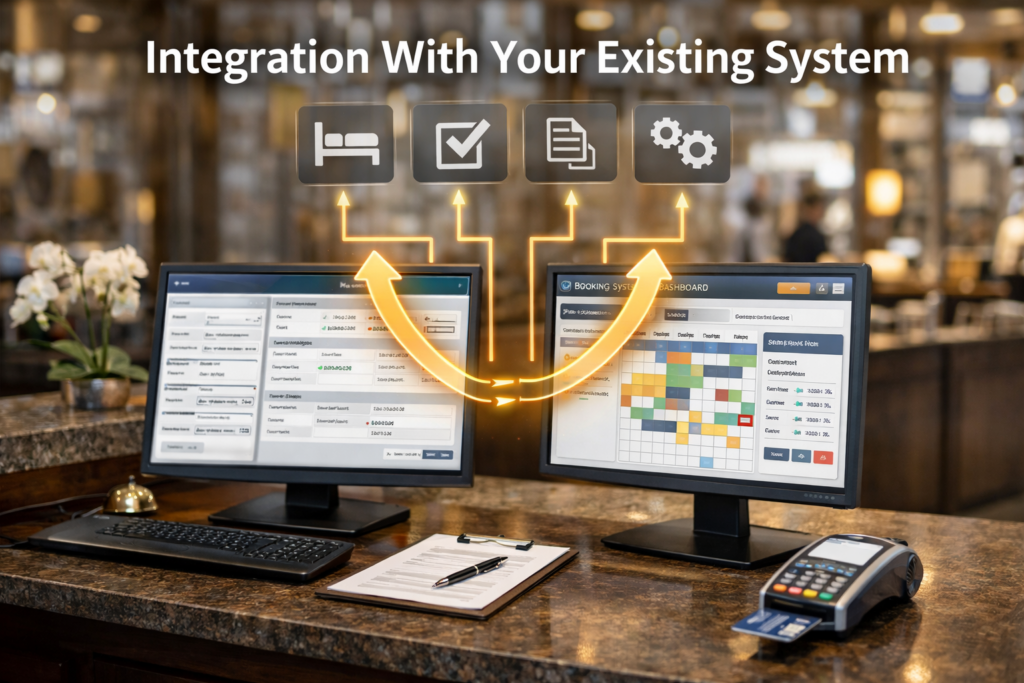
Appointment reminders work best when fully integrated with your booking system and practice management software. In fact, this creates a seamless, automatic workflow from booking to visit. As a result, it reduces manual work while improving overall scheduling efficiency.
Booking System Sync for Appointment Reminders
Your reminder system connects directly to your schedule no manual setup required for each appointment.
- Real-time schedule updates
- Automatic reminder triggers on booking
- Accurate appointment details every time
Practice Management Integration for Appointment Reminders
Patient data stays synchronized so your team always has the most current confirmation status without manual checking.
- Patient data stays automatically updated
- Staff sees confirmations instantly in dashboard
- Workflow stays organized and stress-free
🔗 This creates a seamless system from booking to visit with zero manual work required from your front desk team.
Two-Way Appointment Reminders = More Conversions
Modern systems allow patients to respond instantly, turning passive notifications into active conversations that protect your schedule. In fact, this immediate interaction reduces delays in confirmation. Additionally, it improves patient engagement by making communication effortless. As a result, your schedule stays more stable and predictable, with fewer last-minute gaps.
Easy Appointment Confirmation
Patients confirm with a single reply or one click no phone call required, no hold music, no frustration.
- One-click or simple reply confirmations
- Immediate schedule updates
- Reduced front desk workload
Simple Appointment Rescheduling
When patients can’t make it, they reschedule instead of simply not showing so you still get the visit, just at a different time.
- Quick options to change appointment times
- Direct link to online booking
- Prevents total appointment loss
Early Cancellation Capture with Appointment Reminders
Patients who cancel early give you time to refill the slot turning a potential loss into a recovered appointment.
- Patients cancel earlier instead of no-showing
- Slots can be refilled quickly
- Schedule stays optimized throughout the day
💬 Two-way messaging transforms your reminder from a one-way broadcast into a conversation and conversations convert. Practices with two-way messaging see up to 3× more confirmations than those using one-way alerts alone.
How Personalization Improves Appointment Reminder Response Rates
Generic reminders get ignored, while personalized ones get responses. In fact, personalization significantly increases engagement. As a result, patients are far more likely to confirm appointments.
❌ Generic Appointment Reminders Get Ignored
Patients tune out messages that feel like mass broadcasts. No name, no context, no reason to act.
✅ Personalized Appointment Reminders Get Results
Patients respond to messages that feel human using their name, their doctor, and details specific to their visit.
👤 Use Patient’s First Name
👨⚕️ Include Provider’s Name
🕐 Specify Date and Time Clearly
📋 Add Visit-Type Instructions
💬 Use a Friendly, Warm Tone
🔗 Include Easy Reply or Click Action Options
ROI and Growth Impact of Appointment Reminders
A strong reminder system delivers measurable, trackable results. In fact, even small improvements in attendance significantly increase revenue over time. Additionally, these gains compound across multiple appointments each day. As a result, practices see a steady rise in production without increasing marketing spend.
No-Show Rate Reduction with Appointment Reminders
Increased Daily Production from Appointment Reminders
Staff Time Saved with Automated Appointment Reminders
Improved Patient Experience Scores from Appointment Reminders
“Even a 2% improvement in attendance across 400 monthly appointments can recover 8 lost visits per month which at an average value of $300 per visit, means $2,400+ in monthly revenue recovered from a single system change.”
Common Mistakes to Avoid in Appointment Reminders
These five mistakes silently limit your reminder system’s effectiveness. In fact, they directly reduce your practice’s revenue. Additionally, fixing them quickly improves both efficiency and results. As a result, your schedule becomes more stable and predictable.
Using Only One Appointment Reminder Channel
Relying on a single channel whether text, email, or phone means you miss every patient who doesn’t respond to that method. No single channel reaches everyone.
✔️ Implement all three channels: SMS, email, and voice. Use them in sequence so patients who miss one are caught by the next.
Sending Generic Appointment Reminder Messages
Messages that feel like mass broadcasts are ignored or deleted. Patients don’t feel connected to generic alerts, so they don’t act on them.
✔️ Personalize every message with the patient’s name, provider name, exact time, and visit-specific instructions. Make it feel human.
Poor Timing of Reminders
Sending reminders at 6 AM or 9 PM generates complaints and opt-outs damaging your relationship with patients and reducing future effectiveness.
✔️ Send between 9–11 AM or 5–7 PM. Never before 8 AM or after 8 PM. Test and optimize based on your patient response data.
No Patient Response Option in Appointment Reminders
One-way reminders miss the most powerful feature of modern systems: two-way communication. If patients can’t respond, they can’t confirm and your fill rate suffers.
✔️ Enable two-way messaging so patients can confirm, reschedule, or cancel with a single reply. Two-way systems dramatically outperform one-way alerts.
Ignoring Patients Who Don’t Respond to Appointment Reminders
Non-responders are your highest no-show risk. Ignoring them and hoping they show up guarantees empty chairs and lost revenue.
✔️ Create a follow-up sequence specifically for non-responders an escalating chain of SMS, email, then voice call that catches every potential no-show before the day of.
Stop Losing Revenue from Missed Appointments
Appointment reminders are one of the most effective ways to reduce no-shows and stabilize your dental practice schedule. See your reminder system in action or get a free no-show audit to discover exactly what your practice is losing.